What is it?
Ksumiyo is built for creators who want to create songs with AI on the web today and carry the same creative workflow into the Android app experience.
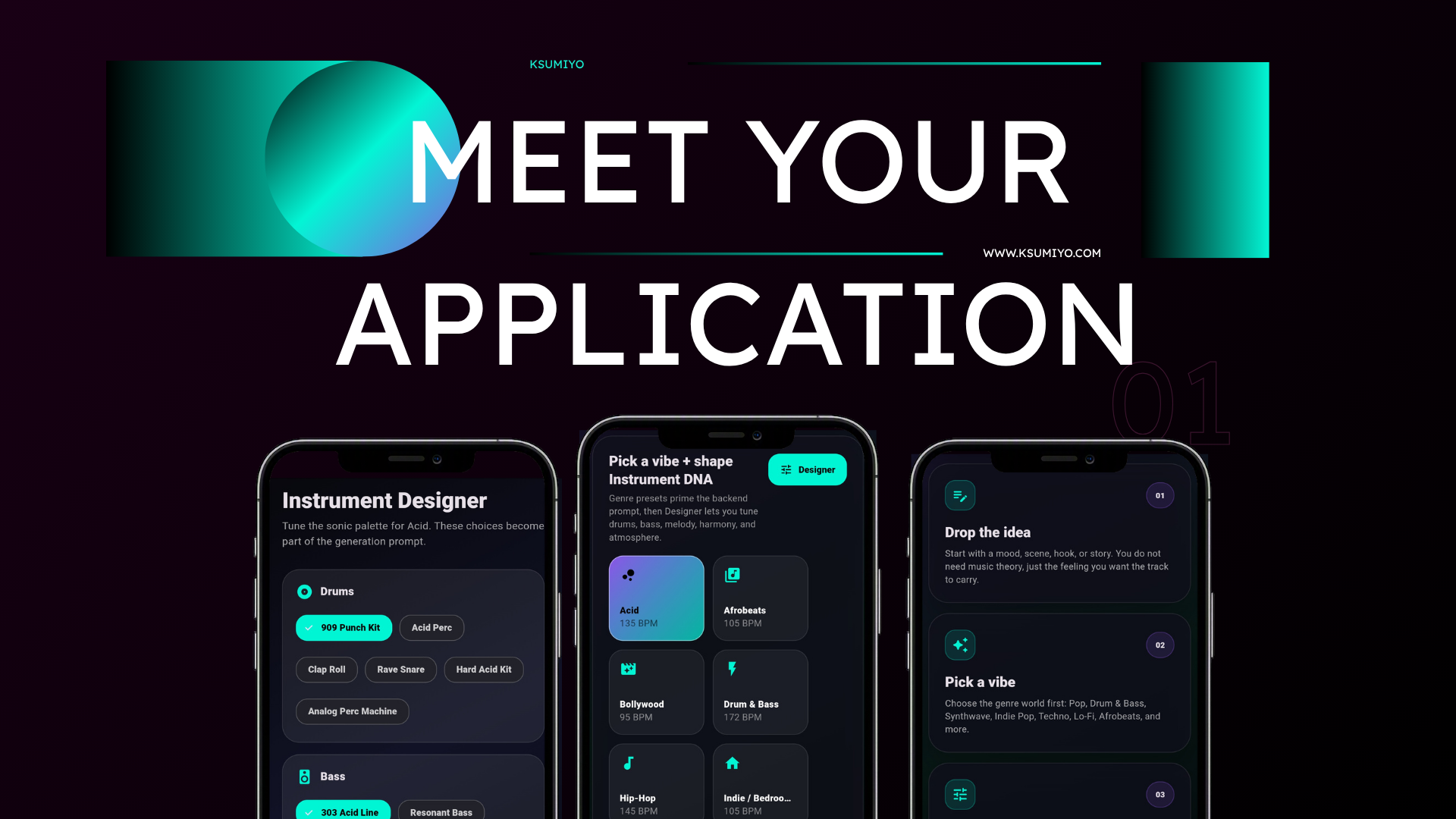
AI song maker app free
Ksumiyo is built for creators who want to create songs with AI on the web today and carry the same creative workflow into the Android app experience.
Start from a prompt, lyric, mood, or blank canvas, then shape the sound with Designer before generating a finished track.
Built for
Creative control
Quick answers
Ksumiyo is built for creators who want to create songs with AI on the web today and carry the same creative workflow into the Android app experience.
Free AI song ideas for videos and social posts Lyric and mood-based tracks for creator projects Ksumiyo is built for creators, teams, and beginners who want original music without opening a traditional production setup.
Open the studio and choose a vibe. Write lyrics, describe the mood, or leave the prompt blank. Use Designer to tune the song's musical DNA. Generate, download, and remix the track when needed.
Free AI song ideas for videos and social posts Lyric and mood-based tracks for creator projects Mobile-first song creation workflows Royalty-free drafts for YouTube, podcasts, games, and films
Ksumiyo currently includes free generation limits so visitors can try the studio, test ideas, and learn the workflow before account features expand.
Ksumiyo is designed for royalty-free creator and commercial workflows, subject to the Terms and Music Rules. Keep your Track DNA for your own records.
Start from a prompt, lyric, mood, or blank canvas, then shape the sound with Designer before generating a finished track.
Workflow
Open the studio and choose a vibe.
Write lyrics, describe the mood, or leave the prompt blank.
Use Designer to tune the song's musical DNA.
Generate, download, and remix the track when needed.
Why Ksumiyo
Many AI music tools ask you to write a perfect prompt. Ksumiyo gives you the prompt plus a control layer, so you can guide the producer before the track exists.
Prompt optional
Genre-first workflow
Instrument DNA
Remixable settings
FAQ
Ksumiyo currently offers a free song creation workflow on the web, with Android app alignment planned around the same vibe, Designer, View DNA, and Remix DNA controls.
Yes. Ksumiyo offers free daily generations for testing and creating tracks. Limits may change as the product grows.
Yes. You can add lyrics, a hook, a story, or a mood. The prompt is optional, so you can also start from a vibe and Designer settings.
Explore the cluster
Popular song ideas
AI music with creative control
Start with a vibe, shape the Instrument DNA, and generate music that fits the project.